

Integrate Vero and Stitch
Stitch is a modern extract, transform and load (ETL) platform for rapidly moving data from it’s origin source to data warehouses such as Amazon Redshift, Google BigQuery, Snowflake and others. Follow the steps in this guide to push Vero data to your data warehouses via Stitch.Connecting Vero to Stitch
1. Add Vero as a Stitch Data Source
To add Vero as an integration in Stitch:- Sign into your Stitch account and select Add Integration from your Dashboard.
- Select Vero.
- Name your integration. This name will display on the integration but, most importantly, it will be used to create the schema in your destination. We use something like
vero_productionfor our Vero Production Vero project. In Stitch, using this example, you’d name the integrationVero Production. Note: Schema names cannot be changed after you save the integration. - Click Save Integration.
2. Generate a Vero Webhook URL
Once you’ve saved the integration, Stitch will redirect you to a page that displays your Vero webhook URL and token. This will look something like this: Generate a Stitch Data URL for Vero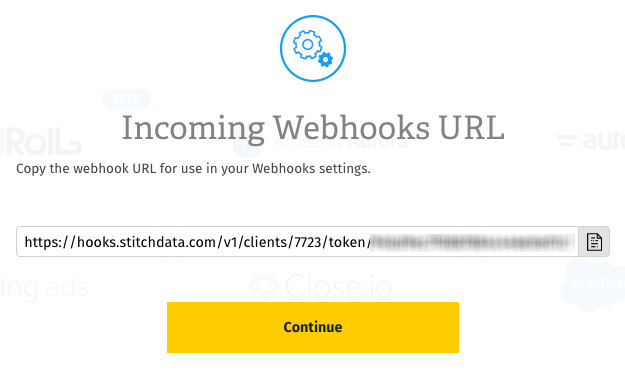
3. Set up Webhooks in Vero
The last step is to setup webhooks in your Vero account with your new URL. To do this:- Sign in to Vero and go to the correct Vero Project.
- Click Settings at the bottom of the navigation menu.
- Go to the Integrations tab.
- Click View next to the Custom Integration (Webhooks) option.
- Click on Add Webhooks Integration.
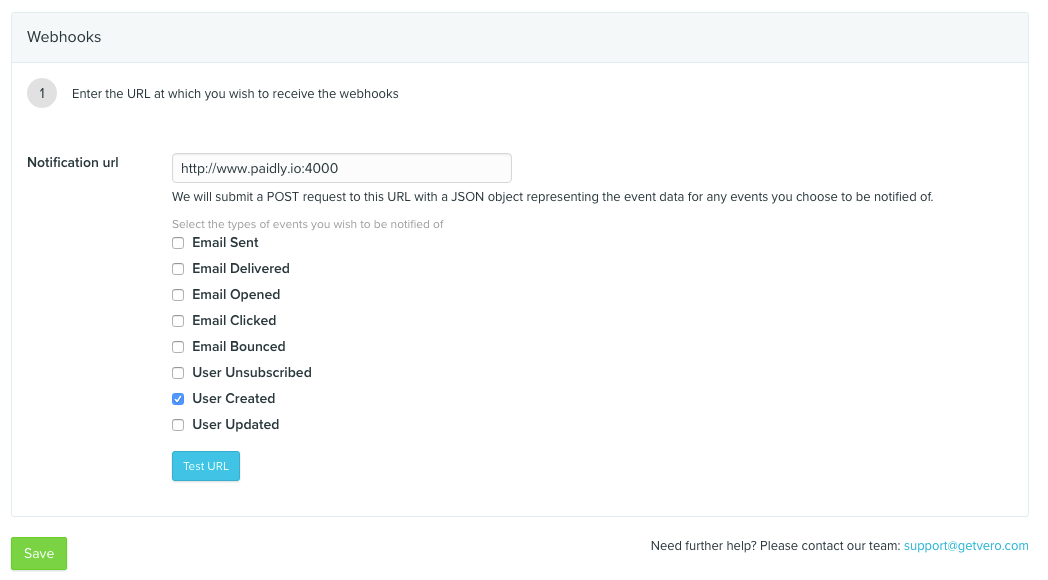
- In the Notification URL field, paste the Stitch-generated URL from the section above.
- Click Save.
- After the webhook has been saved, you can select the individual events you want to track. Use the checkboxes to select events. Our advice is to tick every box.
- Hit Save and you’re ready to go!